
Website Redesign Without Losing Your Google Rankings in 2026

Aug 13, 2026 · 14 min read
Every guide on this subject makes the same promise. Follow the checklist, get the redirects right, and your rankings come through the rebuild untouched. That promise does not come from Google. What Google publishes is something less comfortable and considerably more useful: some fluctuation is normal even when the move is done correctly.
Which turns the question into a better one. Not how to lose nothing, but which losses are temporary and which are permanent, because they have different causes and only some of them belong to whoever builds the site. Everything below is drawn from documentation published by Google or by the platform being described, read on 13 August 2026 and linked where it appears. We build and rebuild websites for a living, so we are an interested party here, and there is a section near the end on who should hire someone else.
The 30-second answer
A redesign should not cost you rankings permanently, but a temporary wobble is expected rather than a sign of failure. Google's own site move guidance says to expect ranking fluctuation during a move, and that a medium-sized site can take a few weeks for most pages to move in its index. Permanent loss comes from a short list instead: changing URLs that did not need to change, redirects that are missing or of the wrong type, deleting content that was earning the traffic, and launch-day mistakes in the settings that control crawling and indexing. The single most protective decision is also the cheapest one. Keep your URLs.
The dip is normal, the loss is not
Start by separating two things that get reported as one. Reindexing lag is Google catching up with a changed site, and it resolves on its own. Permanent loss is Google concluding that a page is gone, duplicated, or no longer the best answer, and it does not resolve on its own.
Google is unusually direct about the first one. Its guide to moving a site with URL changes tells you to expect temporary fluctuation in site ranking during the move, and adds that with any significant change to a site you may see ranking fluctuations while Google recrawls and reindexes. On timing, its general rule is that a medium-sized website can take a few weeks for most pages to move in the index, and that larger sites take longer.
Two things follow from that. If your agency promises no dip at all, they are promising something the search engine does not offer. And if your traffic is down four days after launch, you do not yet have evidence of anything, which is exactly when most people start making panicked changes that genuinely do cause damage.
The honest planning window is weeks. Set the expectation before launch, agree what you will measure, and hold your nerve through the first couple of weeks unless one of the specific failures below is present. Those you fix immediately.
The safest redesign changes no URLs at all
Here is the lever that matters most, and it is usually decided by accident. A redesign is a visual project, but it becomes a search project the moment the URLs change, and they usually change because the new system has its own idea of what a URL should look like rather than because anybody chose it.
Google draws the same line. It publishes two separate guides, one for a site move with URL changes and one for a site move without them. The second guide is mostly about hosting, DNS and crawl rate. It is a smaller, calmer document, because a rebuild that keeps every address is a much smaller event in search terms. Your pages keep their history instead of having to inherit it through a redirect.
So make URL preservation a requirement rather than a preference, and put it in writing before the build starts. If a page is at /services/roof-repair today, it should be at /services/roof-repair the day after launch, even if the content on it is completely new. When a URL genuinely has to change, that is fine, but it should be a decision somebody made and can explain, not a side effect of a template.
This one requirement removes most of the risk in this article. Everything after it is about the cases where a URL really does have to move.
Not every redirect passes the signal along
When a URL does change, the redirect you use decides whether the new page inherits anything. Google splits redirect methods into permanent and temporary, and only the permanent ones act as a canonicalization signal, which is the technical way of saying only they tell Google the new URL is now the real one.
| How the redirect is done | How Google treats it | What that means for a rebuild |
|---|---|---|
| HTTP 301 or 308, server side | Permanent, and a canonicalization signal | The default choice for every moved page |
| HTTP 302, 303 or 307 | Temporary, and not a canonicalization signal | Google keeps showing the old URL, so the new one struggles to take over |
| Meta refresh set to 0 seconds | Interpreted as a permanent redirect | Works, but it is a page-level fallback rather than a plan |
| Meta refresh with a delay | Interpreted as a temporary redirect | Quietly does the wrong thing on a permanent move |
| JavaScript location redirect | Permanent, once the page has been rendered | Depends on rendering succeeding, so it is the weakest option here |
Google states the practical consequence plainly in its redirects documentation: permanent redirects signal to Google to display the new target URL in search results, while temporary redirects maintain the source page in results. A 302 on a permanent move is therefore not a small stylistic difference. It asks Google to keep the old URL, which is the opposite of what you want.
The same page ranks the methods by how likely Google is to interpret them correctly, and puts server-side redirects at the top. That ordering is the whole recommendation. Do it at the server, use 301, and treat meta refresh or JavaScript redirects as a fallback for cases where you have no server access. One detail catches people out: an instant meta refresh is read as permanent, but a delayed one is read as temporary, so a five second redirect on a moved page is a temporary redirect wearing a disguise.
Your platform decides what you are allowed to redirect
Now the part almost no redesign guide mentions, and the one that can quietly cap how well a migration goes. If you are moving onto a hosted platform, your ability to preserve URLs is a product feature with published limits, not something your developer controls.
| Platform | What it publishes about redirect capacity | Bulk handling | Catch worth knowing |
|---|---|---|---|
| Shopify | Up to 100,000 redirects, or 20,000,000 on the Plus plan | CSV import and export | Redirects only work for URLs that return a 404 |
| Squarespace | A URL mappings field capped at 400 KB, roughly 2,500 lines | One text field you paste into | The old URL has to stop existing first |
| Webflow | No hard limit, with 1,000 recommended as best practice | CSV import and export, plus wildcards | Needs a paid Site plan, and rules fire in the order they were added |
| Wix | No published total, but each import file is capped at 500 | CSV import, 500 rows at a time | Rows past 500 in a file are silently not imported |
| Your own server | No vendor cap, since the rules live in your web server config | Whatever your server supports | You are responsible for keeping the map and testing it |
Every number there comes from the company's own documentation, which matters because the second-hand versions disagree with each other. Search for the redirect limit on Webflow and you will find several different hard caps confidently stated by people who do not work there. Webflow says it has no hard limit and recommends 1,000 as best practice, because every rule is uploaded to the site's manifest.json file and that file has to be downloaded by visitors' browsers.
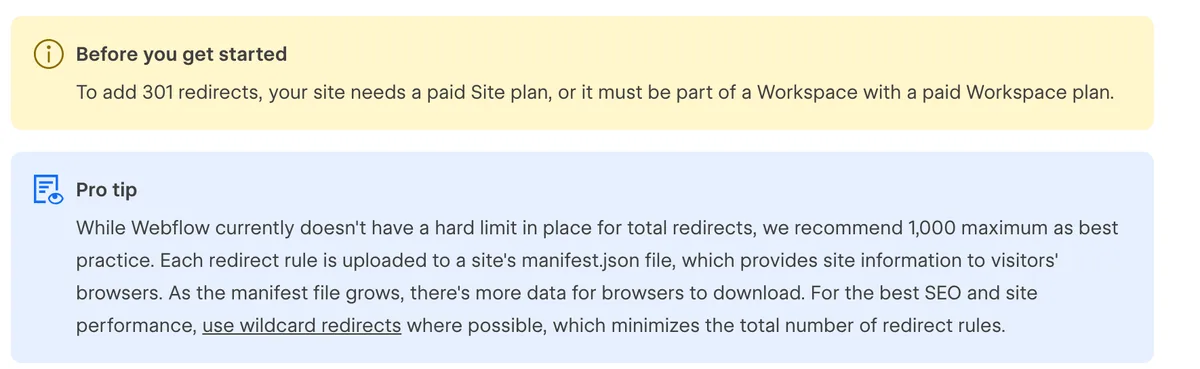
Squarespace takes a different approach again, with a single URL mappings field limited to 400 KB, which it says is usually around 2,500 redirect lines. Shopify publishes a maximum of 100,000 URL redirects, rising to 20,000,000 on the Plus plan. Wix does not publish a total, but its CSV import handles 500 at a time, and it says outright that any redirects listed beyond that limit in a file will not be imported, which is the kind of silent failure that shows up as missing pages three weeks later.
There is a subtler constraint shared across all three hosted platforms, and it changes how you test. Squarespace says the original URL can no longer exist for a 301 to work. Shopify says redirects only work for URLs that return 404 errors. Webflow requires you to delete a page, save it as a draft or change its slug before a redirect to a new location will fire. Read together, that means the redirect map on a hosted platform cannot be fully dry-run before launch, because the old URLs still exist until the moment they do not. On a self-hosted site you can test the entire map against staging in advance. If you are migrating a site with hundreds of ranking URLs, that difference is worth more than any design feature you are comparing.
The 180-day cliff nobody plans for
If your redesign also moves to a new domain, there is a clock running that most checklists describe incorrectly. Search Console has a Change of Address tool, and its job is to forward signals from the old site to the new one and tell Google to prefer the new site when picking canonical pages. It does that for a fixed period.
Google's help page for the tool puts the number at 180 days, repeatedly. Signals are forwarded for 180 days after you start the migration. You see move notifications for 180 days. You can cancel the request for 180 days. And then the sentence that should shape your redirect policy: after the 180 day period, Google does not recognize any relationship between the old and new sites, and treats the old site as an unrelated site, if still present and crawlable.
Set that against the instruction in the site move guide, which says to keep the redirects for as long as possible, generally at least 1 year. The two are not in conflict, they are describing different things. Google's assistance expires after six months. Your redirects are what carry the move after that, which is why the cheapest mistake to avoid is letting the old domain lapse a year later because nobody remembered why it was still being renewed.
Now the correction that matters most, because it applies to the majority of redesigns. The tool is only for moving between domains or subdomains, and Google lists the moves you should not use it for.
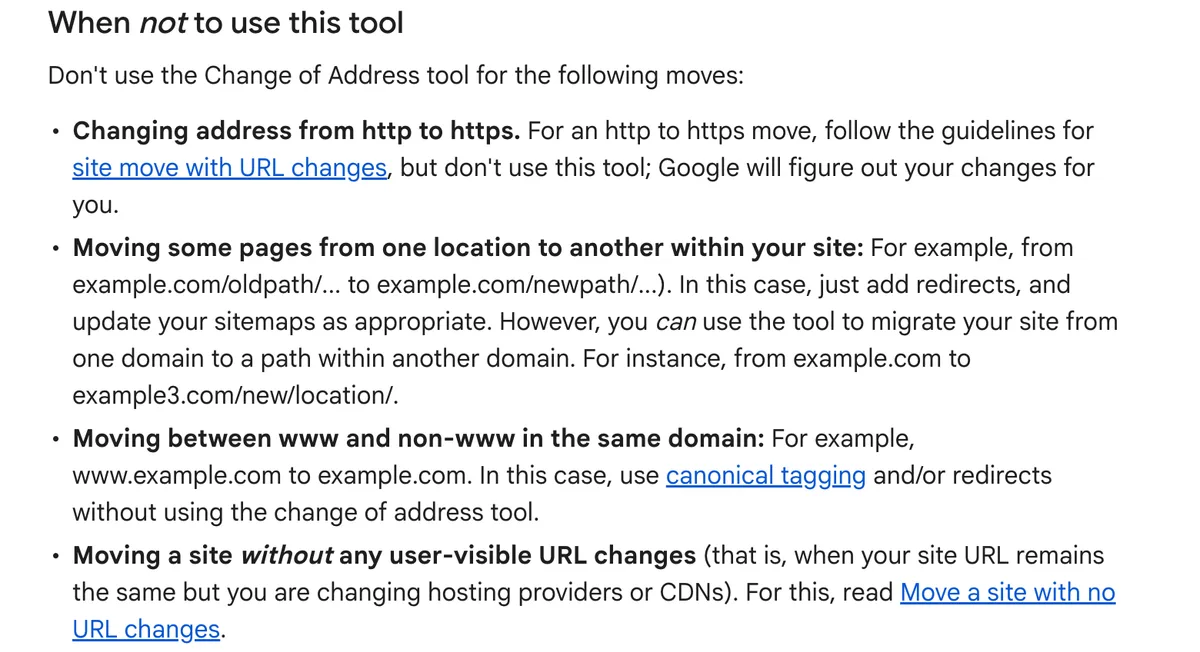
Read that second bullet closely. Moving some pages from one location to another within your site is explicitly not a Change of Address case, and Google's instruction for it is to just add redirects and update your sitemaps as appropriate. If you are redesigning on the same domain, which most businesses are, there is no tool, no forwarding and no notification. There are only your redirects, your sitemap and your own attention. Any guide telling you to submit a change of address for a same-domain redesign is telling you to do something the tool will not let you do.
The instructions that quietly go missing
Beyond URLs, every page carries machine-readable instructions that a rebuild either reproduces or does not. They are invisible in a design review, which is precisely why they get lost in one.
Two of them do the heavy lifting. The canonical tag tells search engines which URL is the real one when several could show the same content, and the robots meta tag says whether a page may be indexed and its links followed. They are common enough on the measured web that your current site very likely uses them, and a new build that omits or reassigns them is changing instructions you never knew you were giving.
The failure mode with real consequences is a single word left behind. A staging site is normally built with noindex on every page so that an unfinished site does not appear in search results, and that is correct practice. It becomes a catastrophe when it ships to production, because the new site politely asks Google to remove every page it has just launched. It is the most common serious redesign failure we see, it produces a total collapse rather than a dip, and it is invisible unless somebody looks at the source of a live page.
There is a quieter version too. The same HTTP Archive analysis found invalid HTML inside the head element on 10.1% of desktop pages, which can cause the head to be treated as ending early so that everything after it lands in the body. Tags in the body do not work. A rebuild that injects a stray element into the head can therefore disable the canonical tag sitting below it while every tag still appears correct in the source.
One small file can switch the whole site off
The other launch-day file is robots.txt, which governs crawling rather than indexing. It is a plain text file, usually tiny, and it can hide an entire website from search engines with one line.
Absence is not the danger here. A site with no robots.txt at all is simply not blocking anything. The danger is the file that exists and says the wrong thing, and the classic way that happens is a staging configuration containing a blanket disallow rule being copied to production along with everything else on launch day.
A detail that catches even careful teams: robots.txt and noindex are not interchangeable, and using both together can backfire. Blocking a page in robots.txt stops it being crawled, and a directive the crawler never sees is a directive it cannot obey. If you want a page out of the index, it needs to stay crawlable long enough for the noindex on it to be read. Blocking first and adding noindex second is a common sequence that leaves pages in the index with no way for Google to learn otherwise.
Deleting pages is the risk nobody budgets for
The technical work above protects addresses. It does nothing to protect what was on them, and a redesign is the single most likely moment for content to be quietly thrown away, because cutting pages makes a site look cleaner in a design review.
It tends to look like this. A site with dozens of pages comes back with a handful, on the reasonable-sounding argument that nobody reads the old ones. Sometimes that is true. Frequently the pages being cut are the ones answering specific questions that brought in the visitors who eventually called, and a redirect to the homepage does not preserve their value. It preserves the address while discarding the answer.
So run this in the opposite order to how most projects run it. Before the design work starts, pull the list of pages that received organic search visits in the last twelve months and mark them as keep. They can be redesigned, rewritten and improved. What they cannot be is deleted or reduced to a paragraph on a combined page without somebody deciding that on purpose, with the traffic number in front of them.
Google's line about any significant change bringing ranking fluctuations covers content as well as addresses. A page that keeps its URL but loses two thirds of what it said is a significant change, and it is one no redirect check will ever flag.
Do not take the site down while you build
One more decision gets made casually and deserves better. Businesses often want the old site replaced by a holding page while the new one is built, on the theory that an outdated site is worse than none.
Google disagrees, in writing. Its guidance on pausing a website says that completely closing a site even for just a few weeks can have negative consequences on Google's indexing of your site, and recommends limiting site functionality instead. If a genuine shutdown is unavoidable for a short period, the documented approach is a 503 response with a retry-after header, which says the site is temporarily unavailable rather than gone.
Build on staging, keep the current site serving, and switch when the new one is ready. A site that looks dated is still answering searches and still taking calls. A holding page is answering nothing while asking search engines to reconsider what your domain is for.
What a safe switchover actually looks like
Pulling the above into the order the work happens in, a competent launch looks like this.
- Staging is unreachable to search engines, and production is not. Password protection is the safest method, because it cannot be forgotten in the way a noindex tag can. Whatever is used, the last task before launch is confirming production carries no leftover blocking.
- Every old URL has a decision. Kept as is, redirected to the closest equivalent page, or deliberately retired. The output is a map, not a mental note, and the homepage is not an acceptable destination for a page about one specific service.
- Redirects are permanent, server side, and tested. On a self-hosted site test the whole map on staging first. On a hosted platform, where redirects only fire once the old URL is gone, test the first batch within minutes of going live.
- The new sitemap goes to Search Console on launch day. Google says to submit the new sitemap so it learns the new URLs, and that you can then remove the old one.
- The head of a live page gets read by a human. The canonical tag and the robots meta tag in the head, then robots.txt at the root, all on the real site after launch. Three checks, five minutes, and they catch the failures that cost entire quarters.
- One move at a time. Google's advice on site moves is not to chain them, so a redesign, a domain change and a platform migration on the same weekend is three overlapping recoveries with no way to tell which one hurt.
What to require from whoever builds it
You do not need to run any of this yourself, but you do need it to be somebody's named job. When a redesign loses traffic permanently, it is almost never because the work was impossible. It is because nobody was responsible for it and everybody assumed it was included.
Put four things in the agreement. First, that existing URLs are preserved by default and any change is flagged for approval. Second, that a redirect map covering every old URL is a deliverable you receive a copy of, in a format you can read. Third, that staging is blocked from search engines and production is verified clear on launch day. Fourth, that somebody checks Search Console for coverage errors in the weeks after launch, with an agreed date rather than good intentions.
Ask one question during the pitch and listen closely to the answer: what happens to our current URLs? A team that starts talking about the redirect map, and asks whether you have a list of your top organic pages, has done this before. A team that says search engines figure it out has told you who will be handling it, which is nobody.
What we do, and who should hire someone else
We treat URL preservation as the default and the redirect map as a deliverable, because a rebuild that loses the traffic it inherited is not a successful project regardless of how it looks. Our own redesigns are not exempt from any of the above. The measured outcome we publish is Cornerstone Healing Center, which saw 20% more website conversions after our redesign. Both our numbers are public, a flat $1,499 for a one-time build and $2,499 a month when the work keeps running, and they sit on our pricing page so nobody has to book a call to hear them. Two weeks is the usual gap between starting and going live on a focused build, though on a rebuild the redirect work is what decides whether that launch is safe. Any partnership request gets a reply within 48 hours.
Three cases argue for hiring someone else. If your site has thousands of URLs, years of accumulated redirects and an international structure, hire a technical SEO specialist to own the migration and a design team to work under that plan, because at that size the migration is the project and the design is a workstream inside it. If your current site gets no organic search traffic at all, none of this applies to you and you should spend the money on the design and the offer instead. And if the real goal is more traffic rather than a better website, a redesign is an odd way to buy it, so our piece on traffic that produces no leads is a more honest place to start.
Service businesses weighing a rebuild can read how we work with that market on our local services page, and if you are still choosing between building it yourself and hiring somebody, our comparison of platforms against designers covers that decision.
Freeze these five numbers before anyone touches the site
Finish with this, because it costs an hour and it is the only thing that will tell you afterwards whether the redesign helped, hurt, or did nothing. You cannot measure a change you did not record, and after launch the old version of your site stops being available to measure.
Record these while the current site is still live, and save them somewhere that is not the website.
- The full list of URLs. Export your sitemap, or crawl the site, and keep the file. This becomes the checklist that every redirect is measured against, and no substitute for it exists after launch.
- Your Search Console performance export. Queries, pages, clicks and impressions for the last twelve months, exported to a file. This is the before picture, and it is the evidence that settles any later argument about what changed.
- Your top twenty landing pages from organic search. From analytics, with their visit numbers written down. These are the pages that are not allowed to quietly disappear in a content cull.
- Whatever redirects already exist. Most sites that have been around a while are already redirecting old addresses. Those rules have to survive the rebuild, or you break moves that were made years ago and have been working ever since.
- A copy of the current pages. The actual text, saved as files. When a page loses rankings after launch, the first useful question is what it used to say, and the second is what it says now.
Then put two dates in the calendar: one three days after launch to check indexing, redirects and the head of a few live pages, and one thirty days after launch to compare against the numbers you froze. If the first check is clean and the thirty day comparison is close, the dip you saw in week one was exactly what Google said it would be.
Frequently asked questions
Not permanently, if the URLs and content are preserved and the redirects are done properly. A temporary fluctuation is normal and expected, and Google's site move guidance says as much in writing. Permanent loss comes from specific causes rather than from redesigning as such: changing URLs without redirecting them, using temporary redirects for permanent moves, deleting pages that were earning the traffic, or launching with a noindex tag or a blocking robots.txt left over from staging.
 SEO & Growth
Aug 9, 2026 · 13 min
Delivery App Fees in 2026: What They Take and What Ordering Direct Costs
Uber Eats raised its US marketplace fees in March 2026 and New York's famous 15% cap now tops out at 43%. Here is what each channel costs on the same $40 order, at rates the companies and regulators publish themselves.
 SEO & Growth
Jul 30, 2026 · 14 min
Website Traffic But No Leads? How to Find the Leak and Fix It
4,000 visitors, three form fills, two of them spam. Here are the six places leads actually leak, in the order worth testing, with the data behind each one.
 SEO & Growth
Jul 29, 2026 · 16 min
How to Get Recommended by ChatGPT and Google AI in 2026
AI assistants now recommend businesses millions of times a day. Here is the 7-step playbook to make sure yours is one of them.